Most enterprise search starts with an empty box and assumes you know what you are looking for. Legal work does not happen that way. A litigator is not searching the firm; they are working a matter. The motions, the pleadings, the engagement letter, the secondary considerations memo; these belong to a case, and the case is the unit of organization. SWIRL 5 is built around that reality.
The dashboard mirrors the matter
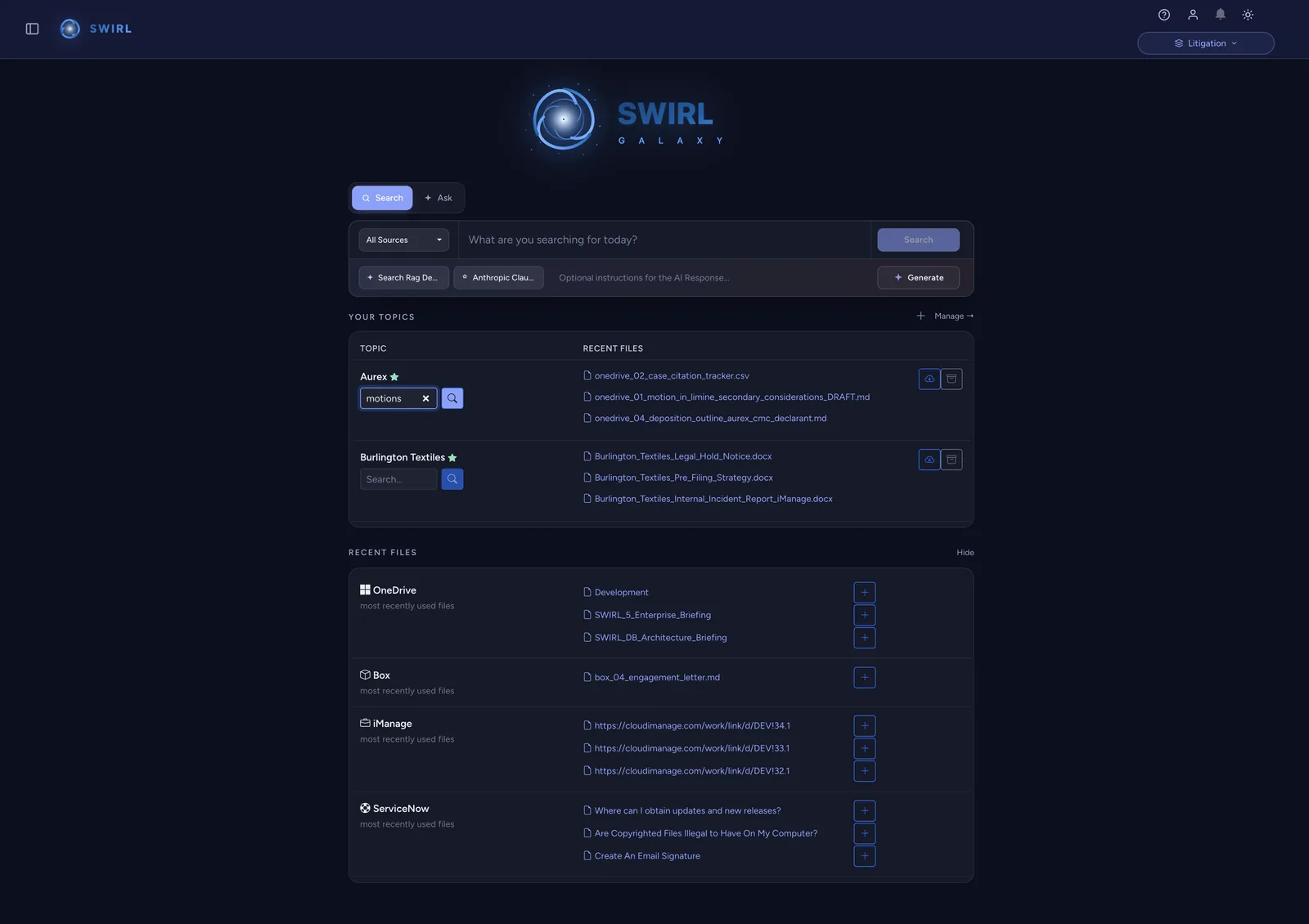
SWIRL 5 opens on a home dashboard that organizes knowledge into workspaces and topics rather than a single firehose of results. A workspace can map to a client, a matter, or a practice area. Within it, topics narrow further; a litigation workspace might carry topics for motions, depositions, or secondary considerations. The structure is the searcher's, defined to match how the team already files its work.
Recent files from every source, in one place
Underneath the workspaces, SWIRL 5 surfaces recent files from every connected system at once: OneDrive, Box, iManage, ServiceNow, and more. A new draft saved to the DMS, an engagement letter in Box, a ticket in ServiceNow; they appear together, each one click from being pulled into the matter. The team stops hopping between tabs to remember where the latest version landed.
Search that already knows the matter
Because the dashboard is matter-aware, search inherits that context. Scope a query to a workspace and SWIRL constrains the federated search to the sources and topics that belong to it. A search for "motions" inside one matter does not drag in every motion the firm has ever filed; it returns the motions for the case you are working. The scope is explicit, visible, and yours to widen or narrow.
Configuration, not a rebuild
Adding a source to a workspace is configuration, not a coding project. SWIRL 5 connects to the systems a legal team already runs, including Box, iManage, Microsoft 365, Google Workspace, ServiceNow, and Salesforce, and brings their content into the matter view without copying it. Permissions are enforced live against the source, so a workspace never becomes a back door around the access controls on the underlying documents.
Why a matter-shaped workspace matters
When the tool is organized the way the work is organized, two things happen. People find what they need without first translating "the Aurex motions" into a query language, and the AI layer inherits clean, matter-scoped context instead of guessing. A dashboard built around the matter is not a cosmetic change; it is what makes governed, scoped retrieval feel native to legal practice.
See how a matter-scoped workspace looks against your own systems.
Get SWIRL 5